
Automating Knowledge-Video Editing with Codex: A Complete A/B-Roll and Visual-Orchestration Workflow
This article is adapted from xilo's long-form post, “Codex Editing Part 3: Two Videos, Nearly Four-Figure Sponsorships, and a Full Knowledge-Video Method”. The original post was published on August 22, 2026 and later updated. The views, sponsorship counts, tool experiences, and revenue described by the author are a personal case study, not a GPT88 guarantee.
AI video editing is often described as “give an Agent a script and get a video.” In practice, quality depends less on one model than on whether content, voice, visual type, assets, timing, and acceptance have been specified before rendering.
The method in xilo's post uses A-roll for human expression and emotion, and B-roll for explanation and information. The workflow finalizes narration first, creates a millisecond timeline and visual-orchestration table, then lets Codex build and render the shots.

Why Knowledge Videos Fit A-Roll Plus B-Roll
Knowledge videos need two things at once: the viewer should feel that someone is explaining the topic, and abstract information should become visible.
| Visual type | Main job | Typical content |
|---|---|---|
| A-roll | Carry presence, voice, and emotion | Opening, transitions, opinions, reactions, contextual expression |
| B-roll | Explain facts, concepts, and procedures | Screenshots, recordings, diagrams, comparisons, key text |
If a sentence adds no specific knowledge but must be spoken, A-roll is often the better fit. Steps, concepts, numbers, interfaces, and relationships usually benefit from B-roll.
Alternating the two also reduces the Agent's search space. It first decides whether a segment is A-roll or B-roll, then selects a template and asset rule for that class instead of inventing every shot from zero.

Start with the Content Goal
Do not treat “AI-generated video” as the value proposition. A useful content plan should answer:
| Question | What to decide |
|---|---|
| Visual difference | Why should someone stop instead of scrolling past? |
| Content value | What concrete action can the viewer complete afterward? |
| Product relationship | Is the product actually on the critical path? |
| Delivery boundary | Which parts are demonstrations and which are reproducible capabilities? |
| Evidence | Are views, conversion, sponsorship, and cost recorded? |
Tool efficiency solves production overhead. It does not replace a clear problem, understandable explanation, or reproducible steps. Do not turn unverified model capabilities, prices, or revenue into advertising claims.
The Full Workflow
Break the work into four stages and keep an artifact at each boundary:
Script and narration
  → audio analysis and timeline
  → visual-orchestration table
  → shot-by-shot A/B-roll production and acceptance
When the final video is misaligned or too slow, these artifacts make it possible to locate the problem in the script, voice, orchestration, or render instead of rebuilding the whole video blindly.
1. Prepare the Script and Narration
The script does not need to be generated by Codex. A writing model can organize research and structure first, then a finalized script can be handed to the editing Agent. For GPT88 users, choose the model from the current model directory rather than hard-coding an assumed model ID; call GET /v1/models before a production job.
Generate the narration as one continuous track when possible. Sentence-by-sentence synthesis often creates inconsistent volume, timbre, pauses, and alignment.
The voice task should include the final script, voice or character direction, pacing, pronunciation of proper nouns, paragraph pauses, and output format. Do not infer that an API supports the same voice parameters just because a ChatGPT client or another product exposes a voice entry point.
2. Build a Millisecond Audio Timeline
The audio file is not enough. Reanalyze it and create a shared timing reference:
[0000ms-1249ms] Today we are looking at AI-assisted editing
[1249ms-3580ms] The key is not the number of shots
[3580ms-6120ms] It is the alignment of voice, visuals, and structure
Check that the first segment begins near zero, timestamps are monotonic and non-overlapping, the last segment covers the complete audio, and model names and proper nouns were recognized correctly.
Store the timeline as JSON so later scripts can consume it:
{
  "audio": "narration.wav",
  "segments": [
    { "startMs": 0, "endMs": 1249, "text": "Today we are looking at AI-assisted editing" },
    { "startMs": 1249, "endMs": 3580, "text": "The key is not the number of shots" }
  ]
}
3. Treat the Visual Table as Script Plus Storyboard
The table should tell the Agent whether a segment is A-roll or B-roll, what is on screen, which asset to use, how captions appear, and how the shot connects to the previous one.
| Field | Example |
|---|---|
segment | s03 |
startMs / endMs | 3580 / 6120 |
roll | A or B |
visualType | host, screenshot, diagram, quote |
visualBrief | Three-step flow highlighting API, model, and logs |
asset | Local screenshot path or generation ID |
motion | Enter from the left; light nodes in sequence |
caption | Exact text that must appear |
transition | cut / dissolve / match |
acceptance | No text errors; duration covered; brand colors |
Review the table before rendering the full video. Check whether A-roll and B-roll alternate naturally and whether one visual type repeats for too long.

A-Roll: Consistency and Point of View
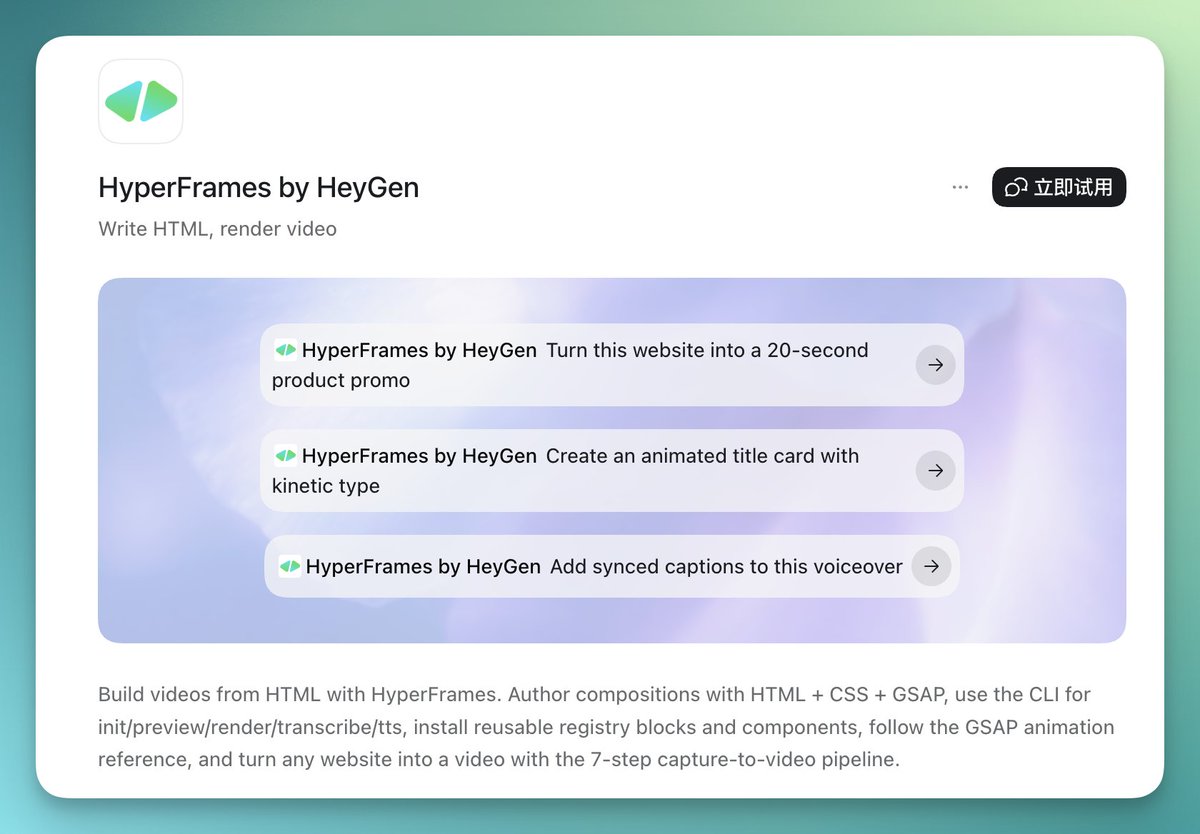
A-roll makes the explanation feel situated. It may use an IP character, virtual host, real person, or product character, but the viewer should feel that someone is speaking to them.
A single reference image is rarely enough to keep body shape, facial details, clothing, and rendering style stable. Use a reference package with multiple angles, close-up details, scene references, and brand rules. State the invariants explicitly in prompts and inspect every generated shot.
Vary the point of view when it serves the message: host-to-camera for openings and summaries, an in-scene character for actions, a second character for another perspective, or first-person views for screen and environment demonstrations. Variation should support information or emotion, not merely increase render cost.
B-Roll: Choose the Production Method by Asset Type
B-roll usually falls into three classes:
- Existing assets: product screenshots, recordings, conversations, or real photos.
- No existing assets: diagrams, cards, process views, and motion graphics.
- Text-only: section titles, key statements, conclusions, and short prompts.
Existing assets require permission, privacy review, and redaction. Generated graphics should express real relationships rather than decorate without meaning. Text-only shots need strict limits on length, hierarchy, and display time so viewers can finish reading.

Build a Reusable Asset Library
Common structures such as three-step flows, comparisons, timelines, checklists, metric cards, and section transitions should not be redesigned from zero for every video.
Parameterize canvas size and safe areas, brand colors and fonts, maximum text length, spacing, animation duration, and replaceable icons, screenshots, and data fields. Local templates improve consistency, speed, and rollback. Open-source libraries still require license, attribution, font, and commercial-use checks.
HyperFrames, Remotion, and the Rendering Layer
| Direction | Better fit | Watch for |
|---|---|---|
| HyperFrames | Design-led compositions and fast Agent-generated motion | Plugin versions, asset paths, and render output |
| Remotion | Frame-level control, React components, and mature templates | Explicit project structure and timing calculations |
Neither tool guarantees a good final video. Render a short sample first and inspect text, animation, audio alignment, fonts, image paths, and export format before scaling up.
Where GPT88 Fits
GPT88 is better suited to model access and task orchestration than to replacing every editing application:
GPT88 API
  ├─ script rewrites, titles, and shot summaries
  ├─ image or visual-asset generation
  ├─ structured timelines and visual plans
  └─ QA checklists and retry suggestions

Local workflow
  ├─ voice synthesis and audio analysis
  ├─ HyperFrames / Remotion rendering
  ├─ subtitle burn-in and audio-video muxing
  └─ final file inspection
Use an OpenAI-compatible interface where appropriate, keep credentials in environment variables, query the current model list, and add budgets, request IDs, timeouts, retry limits, and failure logs to batch jobs. Never hard-code a model ID or price that may change.
Sample First: One Minute Before the Full Video
Make a roughly one-minute sample containing an opening A-roll, one knowledge B-roll, a transition, readable subtitles, a character action or point-of-view change, sound, and a complete ending.
Acceptance should cover:
| Check | Pass condition |
|---|---|
| Audio sync | Keywords enter with the matching visual and caption |
| Pacing | No long repetition of one shot type; pauses feel natural |
| Character consistency | Shape, face, linework, clothing, and color remain stable |
| Text accuracy | Model names, dates, prices, and brands are exact |
| Readability | Titles, labels, and flows work on a phone-sized screen |
| Brand consistency | Color, type, logo, and tone stay aligned |
| Deliverability | Resolution, frame rate, audio, bitrate, and container are correct |
Summary
The transferable lesson is not that an Agent can edit a video without supervision. It is that a knowledge video becomes easier to automate when the semantic job, audio clock, visual decision, asset rule, and acceptance condition are explicit.
The original author's performance and tool results remain a personal case study. Reproduce the workflow locally, inspect real media, and keep human approval at the points where publishing, privacy, licensing, or factual accuracy matter.